
Managing your account

Learn how to use your Capital Guardians account, read your statements and understand invoice statuses.

Index Capital Guardians platform
  1. Capital Guardians platform
    1. How do I access my Capital Guardians account?
    2. How do I link service providers to my account?
    3. How do I use the provider search tool to find local services?
  2. Statements and invoices
    1. When will my monthly statement be ready to view?
    2. How do I read my monthly statement?
    3. What do the different invoice statuses mean?

Capital Guardians platform

How do I access my Capital Guardians account?

How to access Capital Guardians

You can log into your Capital Guardians account at any time using this LINK.

Enter your email address in the “Username” field.

Set your password when prompted. Remember to create a secure password and keep it confidential.

If you forget your password, click on the “Forgot Password” link. You will receive an email with instructions to reset your password. If you don’t receive the email, please contact your Care Advisor or Local Guardians for assistance.

If you have multiple accounts, you can also select the balance figure to view statements for each account.

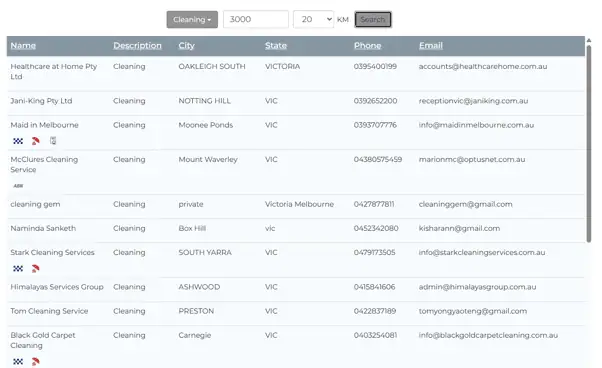
How do I use the provider search tool to find local services?

The Capital Guardians search tool helps you find local service providers for your Support at Home services, giving you more choice and control over who supports you and how you spend your funding.

To get started, click the button below.

Search Service Providers

You can search for providers by entering:

  • Service type: The service you need (e.g. cleaning)
  • Postcode: The area you want to search (e.g. 3000)
  • Search distance: How far you want to search (e.g. within 20 km)
  • Search options for Capital Guardians

Once you have entered your preferences, click Search.

A list of available service providers registered with Capital Guardians in your selected area will appear.

You can then contact a provider directly or ask Local Guardians to help you arrange services with your preferred provider.

Provider search tool results Capital Guardians

Statements and invoices

Your Capital Guardians account allows you or your authorised representative to view your account, invoices and payments online at any time.

Your account is updated in real time, similar to a bank statement. When a new invoice is uploaded, your available funds will be updated to reflect the change.

Once your funding has been allocated, a monthly statement will also be emailed to the primary representative listed on your Local Guardians agreement.

When will my monthly statement be ready to view?

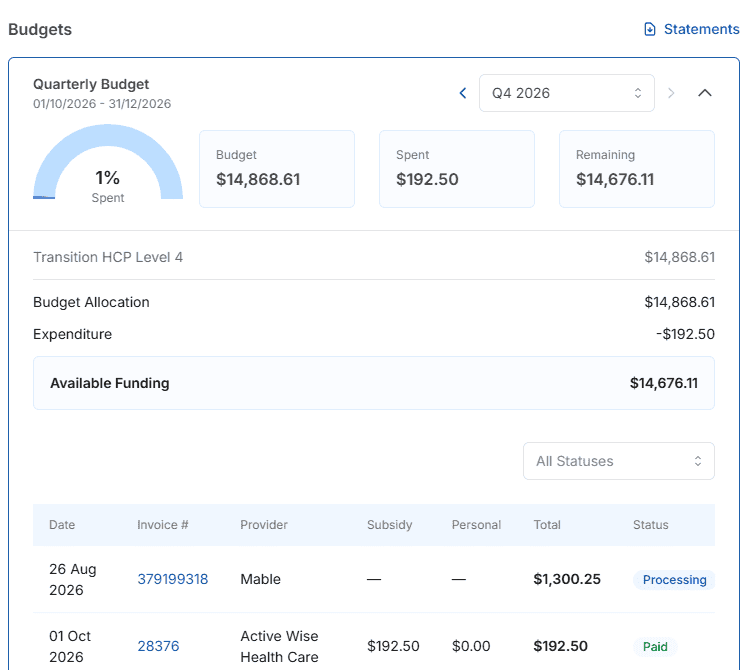
Your monthly accounts are available online and are updated in real time, similar to a bank statement. As soon as a new invoice is uploaded, the available funds will reflect the change.

You or your authorised representative can access your account at any time, day or night, to view invoices and payments.

Once the funding has been allocated, a Monthly Statement will be sent via email to the primary representative as listed on your home care agreement.

How do I read my monthly statement?

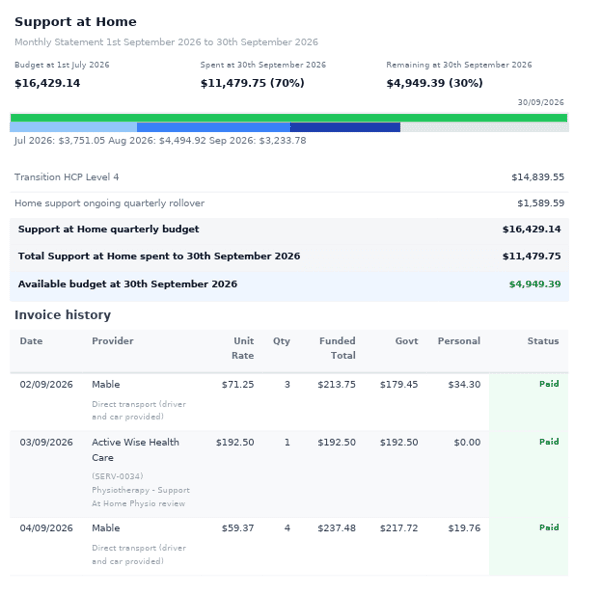
The statement includes several key figures that reflect your Support at Home Funding balance and any contributions or subsidies received from the government. These figures are displayed both as a monthly total and daily amount.

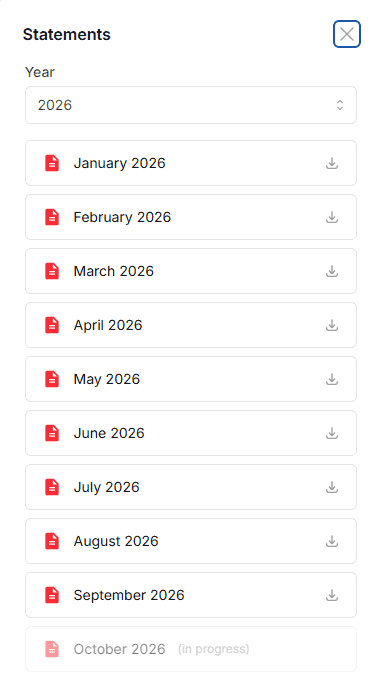
Please note that information displayed below is only available on a print or PDF of the statement. You can produce a PDF from your account in Capital Guardians. To do this, enter the first and last date of the last completed month (as shown in image 2).

Image 1:

Capital Guardians monthly statement

What do the different invoice statuses mean?

Opening Balance: The funds available on the first day of that month.

Level (HCP 1-4, Support at Home 1-8): The current package level and the amount of subsidy accumulated that month (subsidy rate x number of days in the month).

Supplements: Any supplements that are being applied (supplement rate x number of days in the month).

Spending: The total of all invoices processed in that month.

Remaining: The funds available for unpresented invoices for the remaining days of the quarterly funding.

The + Statement link: This takes the user into the detailed PDF statement of the quarters funding that can be saved and printed.

Capital Guardians monthly statement download

Image 2:

Capital Guardians monthly statement breakdown

What do the different invoice statuses mean?

Status Term Meaning
Unclaimed The claim has not yet been submitted to PRODA.
Processing The claim has been submitted to PRODA and is currently being processed. Payment from the Government is pending.
Funded Full payment has been received from the Government. The invoice is ready to be paid subject to a positive wallet balance and approval.
Underfunded Payment from the Government is insufficient for the claimed invoice and cannot be paid.
Pending Review A data issue is preventing the invoice from being claimed or paid. Investigation is required.
Paid The invoice has been successfully paid to the nominated bank account.
Still have a question?

Talk to your local Care Advisor. Call the number for your state or email customer@localguardians.com